Write the stories
only you can tell.
Mythos is an offline-first desktop writing app for novelists, world-builders, and storytellers. Your words, on your machine, always.
Free forever · No account needed for desktop
Everything a writer needs
Built around how stories are actually written — stories, chapters, scenes — with the tools to bring your world to life.
Write freely
Rich text editor with auto-save, typewriter mode, focus mode, and every formatting tool you need. Distraction-free by design.
Organise everything
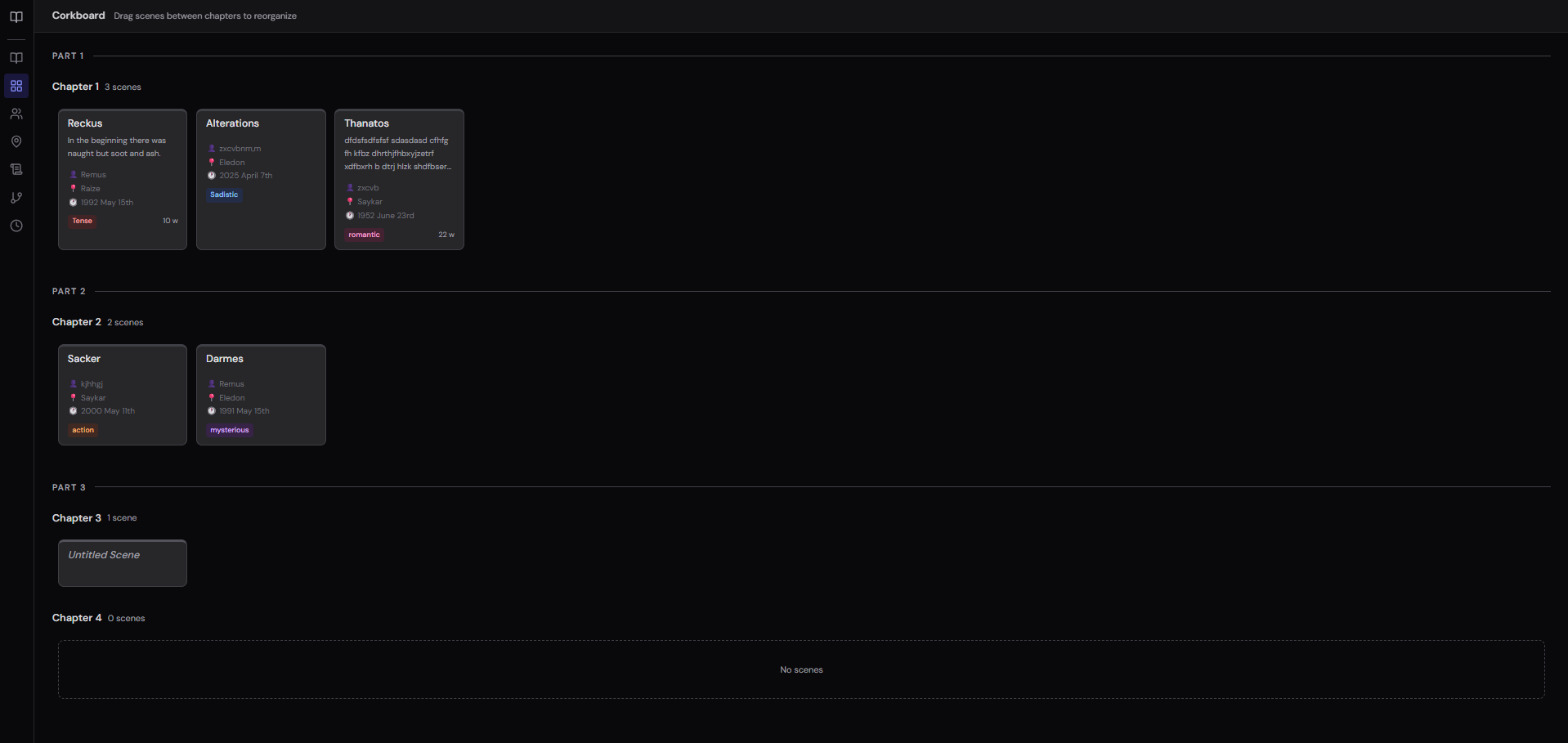
Parts, chapters, scenes with drag-and-drop reordering. Visual corkboard. Scene cards showing every detail at a glance.
Build your world
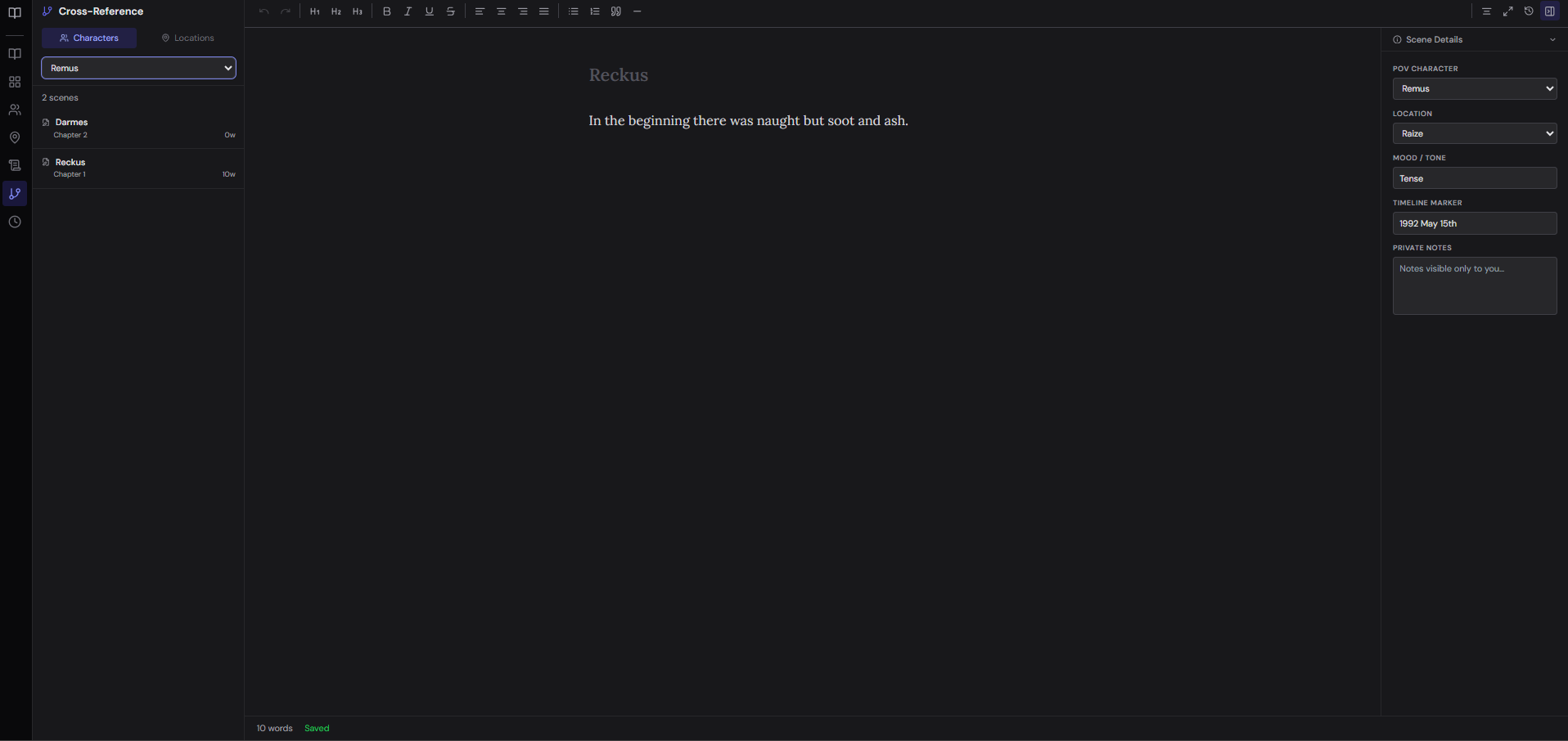
Characters, locations, world notes, and a visual timeline. Cross-reference every scene by POV character or location.
Your story, structured your way
Organise with parts, chapters, and scenes. Drag and drop to reorder. Switch to corkboard view for a bird's-eye view of your narrative structure — see every scene as a card with its POV, location, and mood.
- Drag-and-drop reordering
- Visual corkboard (Pro)
- Chapter status tracking
- Scene metadata
A writing world at your fingertips
Build rich character profiles, detailed location records, and free-form world notes. The cross-reference panel shows every scene where a character appears or a location features.
- Character profiles & roles
- Location records
- World notes by category
- Cross-reference lookup
Track your story's timeline
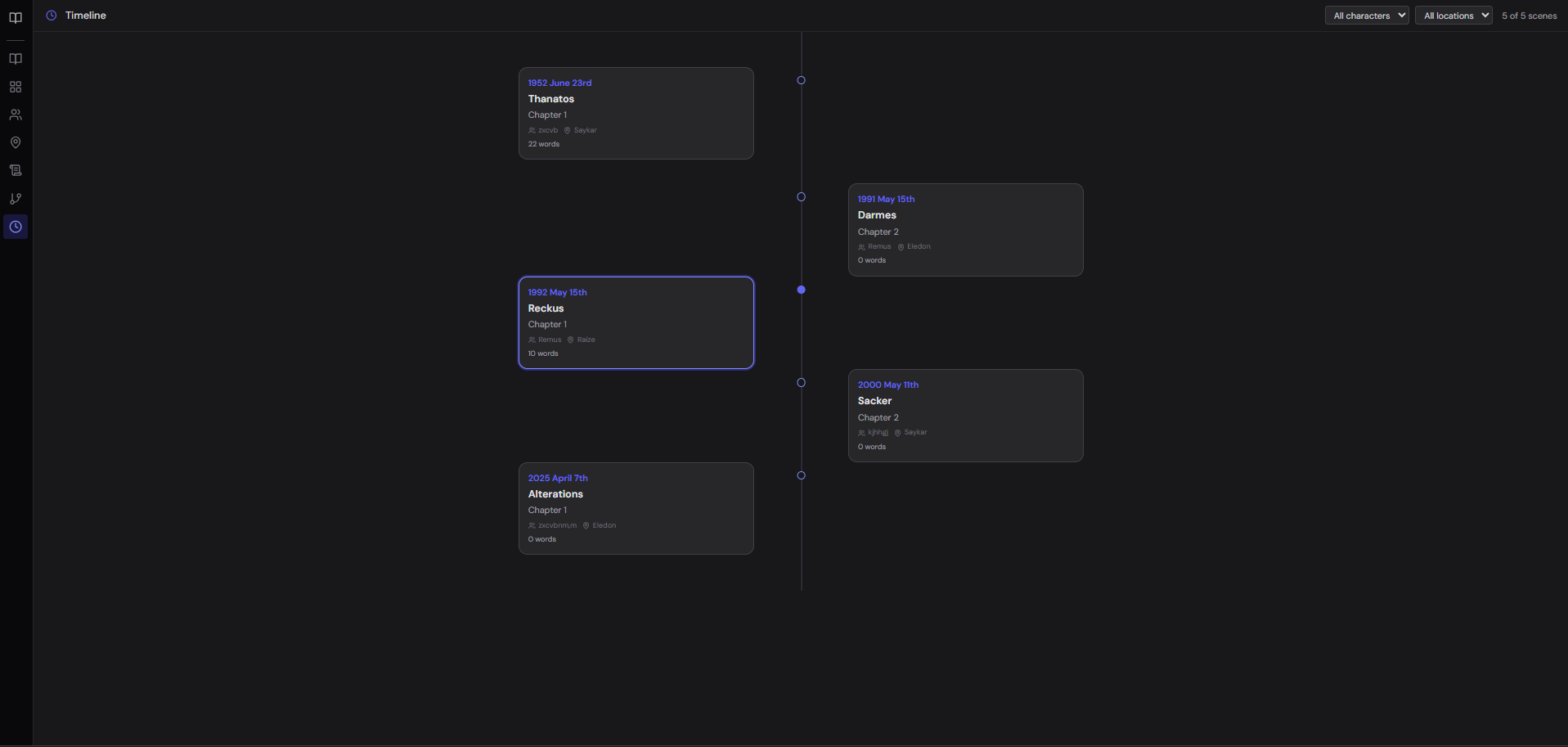
Add in-world dates to your scenes and watch them appear on a visual timeline. Filter by POV character or location to track non-linear narratives and spot continuity issues early.
- Visual timeline view
- Filter by character or location
- In-world date markers
- Non-linear narrative support
Built for novelists and worldbuilders
Mythos isn't a do-everything word processor. It's a focused writing studio for long-form fiction and the worlds behind it — modern where older tools feel heavy.
No steep learning curve
A clean, modern interface that feels familiar from the first minute. Powerful where it counts, simple everywhere else — no week-long onboarding to write your first scene.
Offline-first and private
Your manuscripts live on your machine, not on our servers. Write on a plane or off-grid; nothing leaves your device unless you choose to sync it.
Worldbuilding that connects
Characters, locations, world notes, a visual timeline, and a cross-reference panel that links every scene to its POV and setting — not bolt-on folders you wire up yourself.
Sync that just works
Native cloud sync across unlimited devices with Pro — no juggling third-party folders or fragile workarounds. Pick up exactly where you left off.
Why writers choose Mythos
Purpose-built for long-form fiction — without the bloat, the steep learning curve, or the privacy trade-offs.
| Mythos | Scrivener | Word / Google Docs | |
|---|---|---|---|
| Purpose-built for novels & worldbuilding | |||
| Characters, locations & world notes | ~ | ||
| Visual corkboard & timeline | ~ | ||
| Cross-reference by character or location | |||
| Works fully offline | ~ | ||
| Your data stays on your machine | |||
| Cloud sync across devices | ~ | ||
| Free to start | ~ | ||
| Clean, modern interface |
full support · ~ partial · not available. Comparison reflects typical use; competing tools may vary by version and plan.
More tools you'll love
The small things that make writing days better — thoughtfully built in.
Typewriter mode
Keep the line you’re writing centred on screen so your eyes never chase the cursor down the page.
Focus mode
Fade everything but the sentence — or paragraph — in front of you for distraction-free flow.
Version history & diff
Snapshots of every scene, with a side-by-side diff so you can see exactly what changed and restore anytime.
Writing heatmap
A calendar of your output that turns showing up every day into a streak worth keeping.
Light, dark & sepia
Three handcrafted themes so the page feels right whatever the hour or mood.
Auto-save, always
Every keystroke is saved as you go — close the lid mid-sentence and come back to exactly where you were.
Made for the way writers work
Three kinds of writing days Mythos is built around.
Moving a whole trilogy out of a wall of documents: the corkboard and cross-reference panel finally show the shape of the story — every scene a card, every character traceable across chapters.
The fantasy novelist
Drafting on a laptop in places with no signal: everything lives on your own machine, and when you are back online, Pro sync catches the desktop and web app up with each other.
The offline writer
Building a world alongside the manuscript: characters, locations, and a timeline that catches continuity slips while the scene is still open — not months later in an edit pass.
The worldbuilder
Illustrative scenarios — not customer endorsements.
Simple, honest pricing
Free forever for offline writing. Upgrade for cloud sync and advanced features.
Free
Everything you need to write on your machine.
- Unlimited stories, chapters, scenes
- Full rich-text editor
- Characters, locations, world notes
- Export as TXT and DOCX
- Manual backup & restore
- Light, dark, and sepia themes
- 5 version snapshots per scene
- 1 device
Pro
or $60/year — save 29% · 14-day free trial
For serious writers who want to sync across devices.
- Everything in Free
- Cloud sync across unlimited devices
- Web app access
- Unlimited version history
- Export to PDF and EPUB
- Standard manuscript format
- Visual timeline view
- Writing history heatmap
- Corkboard view
- Automatic daily backups (30-day retention)
Switching from another writing app?
Bring your work with you. Import and export standard DOCX and TXT files, keep full control of your manuscripts on your own machine, and try everything free on desktop — no account required to start.
Frequently asked questions
Everything you need to know before you start writing.
Do I have to pay to use Mythos?+
What happens to my work if I cancel Pro or stop paying?+
Is my data private?+
Which platforms are supported?+
Can I write offline?+
Can I cancel anytime?+
How much does Pro cost?+
Where can I find the legal terms?+
Still have a question? Get in touch.
Download Mythos Desktop
Works entirely offline. Your manuscripts live on your machine — private, always available, no internet required.
Windows · Linux · Auto-updating
Start writing today.
Free forever for desktop. No account needed to download. Upgrade whenever you're ready.